Home › Cybersecurity Tools › Burp Suite: Complete Guide to Features, Installation, Editions, Pricing & Best Practices
Cybersecurity ToolsBurp Suite: Complete Guide to Features, Installation, Editions, Pricing & Best Practices
By Himanshu Borikar • 2026-07-24 • 15 min read
Ask any web application penetration tester what is open on their screen during an engagement, and there is a high probability the answer is Burp Suite. It is the core tool most security professionals build their entire testing workflow around - intercepting requests, replaying them, tampering with parameters, and mapping out application attack surfaces one request at a time.
Burp Suite is a web application security testing platform developed by PortSwigger. At its core, it operates as an intercepting proxy: it sits between your web browser and the target web application, allowing you to capture, inspect, pause, and manipulate every HTTP and HTTPS request before it reaches the destination server. That granular visibility is why Burp Suite has become the industry-standard tool for manual web application security testing.
Web application penetration testers, bug bounty hunters, AppSec engineers, and SOC teams rely on Burp Suite daily. It is equally valuable for beginners because working through HTTP requests and responses by hand in Burp teaches you how web applications actually communicate - foundational knowledge for analyzing vulnerabilities documented in the OWASP Top 10.
This comprehensive guide covers what Burp Suite is, its core editions and pricing, step-by-step installation instructions, getting started workflows, real-world use cases, and how it compares to tools like OWASP ZAP - all centered on authorized, defensive-minded security testing.
Quick Overview & Specification Table
| Attribute | Details |
|---|---|
| Tool Name | Burp Suite |
| Developer | PortSwigger (UK-based Cybersecurity Firm) |
| Category | Web Application Security Testing / Intercepting Proxy |
| License | Proprietary (Professional / DAST); Free Proprietary License (Community) |
| Latest Release | 2026.x Release Series |
| First Release | 2003 |
| Supported Operating Systems | Windows, Linux (Kali, Ubuntu, Debian, Fedora, Arch), macOS |
| User Interface | Graphical Desktop Application (Java-based GUI) |
| Official Website | portswigger.net |
| Official Documentation | portswigger.net/burp/documentation |
| Official Support | portswigger.net/support |
| Pricing | Free (Community Edition); Paid Subscription (Professional Edition); Custom Quote (DAST) |
| Free Edition Availability | Yes - Burp Suite Community Edition |
| Commercial Editions | Burp Suite Professional and Burp Suite DAST (formerly Enterprise Edition) |
| Best For | Manual and semi-automated web application penetration testing, API auditing, bug bounty hunting |
What is Burp Suite?
Burp Suite is a web application security testing platform, built around an intercepting proxy, used to identify vulnerabilities in web applications and APIs during authorized security assessments.
PortSwigger, a UK-based security company founded by Dafydd Stuttard, first released Burp Suite in 2003. It has evolved from a simple HTTP proxy tool into an enterprise testing platform combining manual hands-on tools with automated vulnerability scanning in its commercial editions.
At a technical level, Burp Suite routes your browser traffic through a local proxy listener (by default listening on 127.0.0.1:8080). Every request and response passes through Burp before reaching the destination, enabling real-time inspection, pausing, and payload modification. This proxy-based approach powers core tools like Repeater and Intruder - allowing security engineers to actively manipulate live web traffic rather than passively watching it.
The 3 Core Editions of Burp Suite
Burp Suite is available in three distinct editions tailored to different operational requirements:
- Burp Suite Community Edition:
- Cost: Free forever.
- Capabilities: Essential manual testing tools (Proxy, Repeater, Decoder, Comparer, Sequencer, Logger, Target Site Map, BApp Store extensions).
- Limitations: No automated vulnerability scanner; Intruder rate-throttled; project files cannot be saved in some contexts.
- Best For: Beginners, students, independent security researchers, and manual testing.
- Burp Suite Professional Edition:
- Cost: Paid annual per-user subscription (approx. $499/user/year).
- Capabilities: Full manual toolset plus PortSwigger's automated vulnerability scanner, unthrottled Intruder engine, project file saving/restoration, custom session handling, and advanced search/filtering.
- Best For: Professional penetration testers, AppSec engineers, and active bug bounty hunters.
- Burp Suite DAST (formerly Enterprise Edition):
- Cost: Paid custom quote based on target application volume.
- Capabilities: Scaled, automated Dynamic Application Security Testing (DAST) designed for CI/CD DevOps pipelines, scheduled multi-app scans, role-based access control, and centralized reporting dashboards without requiring desktop GUI intervention.
- Best For: Enterprise AppSec teams and DevSecOps automated deployment pipelines.
Burp Suite is used across finance, technology, government, and consulting sectors - anywhere web applications require rigorous security validation. A typical penetration testing workflow begins with mapping target site structures, intercepting and analyzing HTTP traffic, performing manual tamper testing with Repeater, and documenting verified findings for remediation.
Key Features & Capabilities Breakdown
Burp Suite provides a modular suite of tools that interoperate seamlessly. Below is a detailed matrix of features and their availability across editions:
| Feature | Technical Description | Edition Availability |
|---|---|---|
| Intercepting Proxy | Captures and enables real-time tampering of HTTP/HTTPS requests and responses in transit | Community, Professional, DAST |
| HTTP & HTTPS Traffic Analysis | Inspects request headers, parameters, cookies, body payloads, and response codes | Community, Professional, DAST |
| Repeater | Manually edits and re-sends individual HTTP/HTTPS requests to test parameter manipulation | Community, Professional, DAST |
| Intruder | Automates customized, repeated HTTP requests with payload positions for fuzzing and brute-forcing | Community (Throttled), Professional (Full Speed) |
| Decoder | Encodes and decodes data strings across Base64, URL, Hex, HTML, Gzip, and Octal formats | Community, Professional, DAST |
| Comparer | Performs visual line-by-line diffs between two HTTP requests, responses, or data blocks | Community, Professional, DAST |
| Sequencer | Analyzes the statistical randomness quality of session tokens, CSRF tokens, and cookies | Community, Professional, DAST |
| Target Site Map | Builds a hierarchical structural map of target application URLs, endpoints, and contents | Community, Professional, DAST |
| Logger | Maintains detailed execution traffic logs across all internal Burp Suite tools | Community, Professional, DAST |
| Proxy History | Searchable history record of all intercepted HTTP/HTTPS traffic with filtering | Community, Professional, DAST |
| Automated Scanner | Automated vulnerability scanning engine covering OWASP Top 10 and zero-day patterns | Professional, DAST Only |
| BApp Store Extensions | Ecosystem allowing installation of community and custom Java/Python/Ruby extensions | Community, Professional, DAST |
| Session Handling Rules | Manages complex authentication states, automatic macro logins, and token refreshing | Community, Professional, DAST |
| WebSockets Support | Intercepts, inspects, and tampers with real-time WebSocket frames | Community, Professional, DAST |
| REST API & GraphQL Testing | Parses and tests RESTful JSON endpoints and GraphQL queries/mutations | Community, Professional, DAST |
| Cross-Platform Support | Native Java desktop execution across Windows, Linux, and macOS | Community, Professional, DAST |
The primary practical distinction between editions is the Automated Scanner. Community Edition equips security auditors with every manual tool needed to master web penetration testing, while automated vulnerability scanning and unthrottled Intruder attacks are reserved for Professional and DAST editions.
Burp Suite Intercepting Proxy Architecture
Understanding how Burp Suite intercepts traffic is fundamental to leveraging its capabilities. Burp acts as a man-in-the-middle (MitM) proxy between your browser and the remote server.
+-------------------------------------------------------------------------------+
|                  Burp Suite Intercepting Proxy Architecture                   |
+-------------------------------------------------------------------------------+
|  [Web Browser / Client] (Pre-configured Proxy Listener: 127.0.0.1:8080)       |
|        |                                                                      |
|        v                                                                      |
|  [Burp Suite Intercepting Proxy] (PortSwigger CA Certificate TLS Termination) |
|        |--> [Proxy History & Logger]                                          |
|        |--> [Repeater Manual Tampering]                                       |
|        |--> [Intruder Automated Fuzzing Engine]                               |
|        |--> [Automated Scanner (Pro/DAST)]                                    |
|        |                                                                      |
|        v                                                                      |
|  [Target Application / Remote Web Server] (HTTP/1.1, HTTP/2, WebSockets, REST)  |
+-------------------------------------------------------------------------------+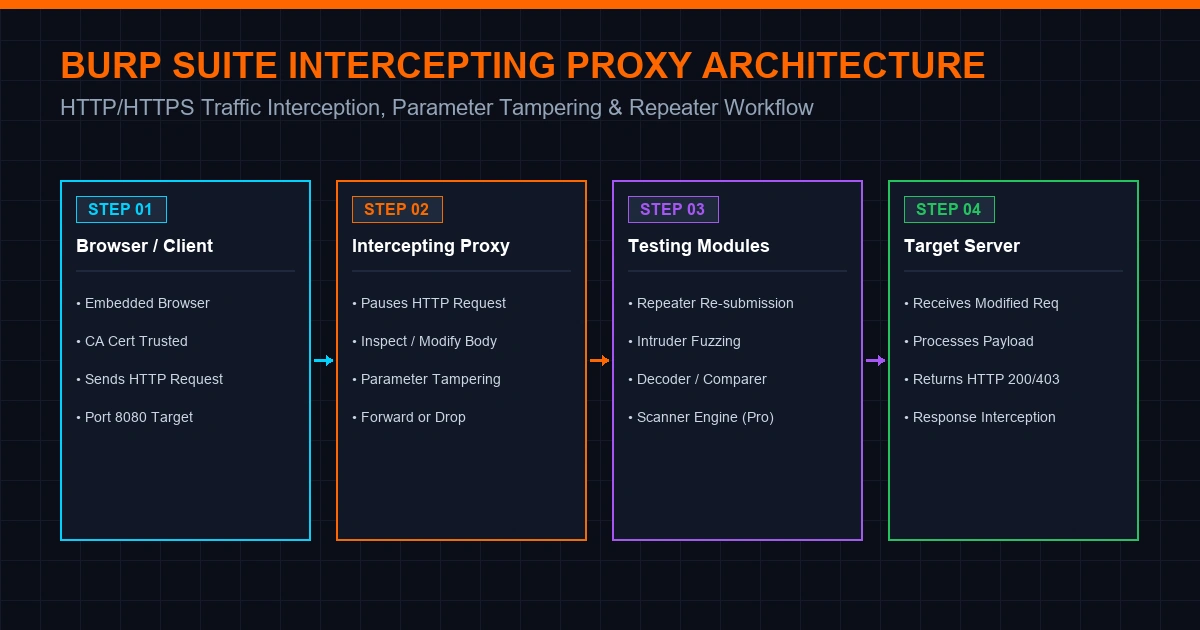
When interception is enabled, Burp pauses outgoing requests from your browser, allowing you to alter headers, inject SQL payloads, modify user IDs, or tamper with form fields before clicking Forward to send the request to the server.
Download & Installation Guide
Always download Burp Suite directly from PortSwigger's official website (portswigger.net). Avoid third-party mirrors or unverified downloads.
Installation Methods by Operating System
| Operating System | Installation Method |
|---|---|
| Windows | Download official .exe installer from PortSwigger and execute setup wizard. |
| Kali Linux | Pre-installed by default (Community Edition). To update: sudo apt update && sudo apt install burpsuite. |
| Ubuntu / Debian | Download official .sh shell installer from PortSwigger and run chmod +x burpsuite_community_linux.sh && ./burpsuite_community_linux.sh. |
| Fedora / RHEL | Download official .sh Linux installer from PortSwigger. |
| Arch Linux | Download official Linux installer from PortSwigger or install via AUR community packaging. |
| macOS | Download official .dmg installer from PortSwigger, open disk image, and drag to Applications. |
Java Runtime Requirements
Modern Burp Suite installers bundle their own isolated Java Runtime Environment (JRE), so a separate Java installation is generally not required - simply execute the official installer for your operating system.
Verifying Installation & Updates
Launch Burp Suite and verify the version string displayed in the splash screen or under Help -> About Burp Suite. Community and Professional editions prompt automatically when a new release is available, or you can download updated installers directly from PortSwigger.
CA Certificate Installation for HTTPS Interception
To intercept encrypted HTTPS traffic without browser security warnings, you must trust Burp's Certificate Authority (CA) certificate:
- Burp's built-in Chromium browser handles certificate trust automatically out of the box.
- For external browsers (Firefox, Chrome), start Burp, navigate to
http://burpin your browser, click CA Certificate to downloadcacert.der, and import it into your browser's trusted Root Authorities certificate store.
Getting Started Step-by-Step Tutorial
The workflow below assumes you are auditing applications you own or have explicit written authorization to test.
- Launch Burp Suite: Start the application and select Temporary Project (or create a new named project file in Professional).
- Select Configuration: Choose Use Burp Defaults and click Start Burp.
- Open Built-in Browser: Navigate to the Proxy tab and click Open Browser. Burp's embedded Chromium browser is pre-configured to route all traffic through the proxy automatically.
- Configure External Browser (Optional): If using Firefox or external Chrome, configure proxy settings to
127.0.0.1:8080and import thehttp://burpCA certificate. - Enable Request Interception: In the Proxy -> Intercept tab, toggle Intercept is ON.
- Capture & Tamper Traffic: Navigate to your target application in the browser. Burp will pause the request. Inspect the parameters, modify values (e.g. changing
admin=falsetoadmin=true), and click Forward. - Send to Repeater: Right-click any interesting request in Proxy History or Intercept and select Send to Repeater (or press
Ctrl+R/Cmd+R). - Analyze in Repeater: Switch to the Repeater tab, modify headers or body payloads, and click Send to observe real-time server responses without triggering browser reloads.
- Review Target Site Map: Explore Target -> Site Map to view the structured tree of discovered endpoints, assets, and parameters.
Real-World Use Cases
Burp Suite serves as an essential tool across multiple cybersecurity disciplines:
- Web Application Security Testing: Core use case for manual vulnerability assessments, input validation checks, access control testing, and business logic analysis.
- API Security Auditing: Testing REST, SOAP, and GraphQL endpoints for broken object level authorization (BOLA), broken authentication, and data exposure.
- Bug Bounty Programs: The industry-standard toolkit for bug bounty researchers testing targets on platforms like HackerOne and Bugcrowd.
- Penetration Testing Engagements: Executing manual and semi-automated security audits for client applications and compliance reports.
- DevSecOps Pipelines: Integrating Burp Suite DAST into continuous integration pipelines to catch vulnerabilities pre-production.
- Security Training & Labs: Hands-on learning platform for PortSwigger's free Web Security Academy and cybersecurity university programs.
Advantages & Limitations
Key Advantages
- Industry Standard: Universally recognized by security employers, penetration testing firms, and bug bounty platforms.
- Granular Control: Unmatched precision in intercepting, modifying, and replaying HTTP/HTTPS traffic.
- Extensive BApp Store: Rich ecosystem of community-developed extensions (e.g. Param Miner, Logger++, Turbo Intruder).
- Cross-Platform: Runs natively across Windows, Linux, and macOS.
- Built-in Browser: Embedded Chromium eliminates manual proxy setup friction.
Limitations
- Automated Scanner Paywall: Automated vulnerability scanning requires a paid Professional or DAST license.
- Learning Curve: Requires solid foundational knowledge of HTTP protocols, cookies, headers, and web architecture.
- Resource Consumption: Large project files with extensive traffic logs can require significant RAM on long engagements.
- Intruder Throttling: Community Edition intentionally throttles Intruder execution speed.
Authorized Testing & Legal Guidelines
Burp Suite is a dual-use security utility. Always adhere to strict authorization guidelines:
- Authorized Scope Only: Only test applications you own or have explicit, written authorization to assess. Unauthorized security testing can violate laws such as the Computer Fraud and Abuse Act (CFAA) and international cybercrime legislation.
- Secure Project Files: Saved
.burpproject files contain captured session tokens, credentials, and sensitive application data - encrypt and store project files securely. - Validate Automated Findings: Automated scanner outputs in Professional/DAST should always be manually verified with Repeater before reporting to avoid false positives.
Pricing & Editions Comparison
| Edition | License Type | Annual Price | Key Features |
|---|---|---|---|
| Community Edition | Free Proprietary | $0 | Full manual proxy tools (Proxy, Repeater, Decoder, Comparer, Sequencer, BApp Store); throttled Intruder; no scanner. |
| Professional Edition | Commercial Subscription | ~$499 / user / year | Full manual toolset; automated vulnerability scanner; unthrottled Intruder; project saving; advanced search. |
| Burp Suite DAST | Enterprise Quote | Custom Quote | Automated CI/CD integration; scalable headless scanning across hundreds of apps; centralized reporting. |
Pricing data accurate at time of writing. Always confirm current rates on PortSwigger's official website.
Burp Suite vs Alternatives Comparison
| Tool | Primary Strengths | Best For | Licensing |
|---|---|---|---|
| Burp Suite | Unmatched manual testing depth, mature Pro scanner, massive BApp extension ecosystem | Professional web penetration testing, bug bounty hunting | Proprietary (Free Community / Paid Pro) |
| OWASP ZAP | Completely free and open-source, full automated scanner included at no cost | Budget-conscious teams, open-source workflows, CI/CD pipelines | Open Source (Apache 2.0) |
| Caido | Modern, lightweight Rust-based intercepting proxy with streamlined UI | Testers looking for a fast, modern alternative proxy interface | Proprietary (Free / Paid) |
| Fiddler | General-purpose HTTP debugging proxy with scriptable rules | Broader web/API debugging beyond security testing | Proprietary |
| Postman | Purpose-built API development, testing, and documentation platform | API functional testing rather than security auditing | Proprietary (Free / Paid) |
When Burp Suite is the Better Choice
For dedicated, in-depth web application penetration testing and bug bounty hunting - especially when the automated Scanner and BApp Store extension ecosystem in Professional add high value to engagements.
When OWASP ZAP is Sufficient
For budget-conscious security teams or developers who require a capable, completely free, open-source automated scanner - see our OWASP ZAP Guide for a closer comparison.
Frequently Asked Questions (FAQs)
1. What is Burp Suite used for?
Burp Suite is a web application security testing platform built around an intercepting proxy. It is used by security auditors and developers to capture, inspect, tamper with, and validate vulnerabilities in web applications and APIs.
2. Is Burp Suite free?
Yes, Burp Suite Community Edition is completely free and includes the full set of manual testing tools (Proxy, Repeater, Decoder, Comparer). Automated vulnerability scanning requires the paid Professional or DAST edition.
3. What is the difference between Burp Suite Community and Professional?
Professional Edition adds PortSwigger's automated vulnerability scanner, unthrottled Intruder execution speed, project file saving/restoration, and advanced search filters. Community Edition includes manual tools only with throttled Intruder speed.
4. Is using Burp Suite legal?
Burp Suite itself is legitimate security software. However, using it to audit or attack applications without explicit written authorization is illegal. Always obtain authorization before testing any system you do not own.
5. Can beginners learn web security with Burp Suite?
Yes. Burp Suite Community Edition combined with PortSwigger's free Web Security Academy provides one of the best hands-on learning environments for mastering web application security and the OWASP Top 10.
Summary & Master Reference Table
| Module | Core Tool / Concept | Primary Function |
|---|---|---|
| 01 Core Proxy | Intercepting Proxy | Captures and tampers with live HTTP/HTTPS traffic in transit |
| 02 Manual Tools | Repeater & Decoder | Manual request re-submission and multi-format data decoding |
| 03 Fuzzing | Intruder | Automated parameter fuzzing, credential testing, and payload injection |
| 04 Analysis | Sequencer & Comparer | Token randomness entropy analysis and visual request/response diffing |
| 05 Extensions | BApp Store | Community extensions ecosystem for extending functionality |
| 06 Automation | Scanner (Pro/DAST) | Automated vulnerability scanning engine for web apps and APIs |
Authored & Verified by Himanshu Borikar (@Layer8sec)
Published on layer8sec Technology & Cybersecurity Audits