Home › Cybersecurity Tools › OWASP ZAP: Complete Guide to Features, Installation, Automation & Best Practices
Cybersecurity ToolsOWASP ZAP: Complete Guide to Features, Installation, Automation & Best Practices
By Himanshu Borikar • 2026-07-24 • 15 min read
If Burp Suite is the industry standard for paid web application security testing, OWASP ZAP is its free, open-source counterpart - and for many development and security teams, it is more than enough. ZAP, short for Zed Attack Proxy, is one of the most widely used web application security testing tools in the world, and it is completely free.
ZAP operates as an intercepting proxy: it sits between your browser and the target application, allowing you to observe and test HTTP/HTTPS traffic, execute automated vulnerability scans, and integrate security testing directly into software development pipelines. Developers, security engineers, and penetration testers all reach for ZAP - developers because it drops smoothly into CI/CD build pipelines, and security professionals because it is a genuinely capable manual and automated security tool at zero cost.
ZAP fits naturally into a Secure Development Lifecycle (SDLC). Instead of security testing happening exclusively at the end of a release cycle, engineering teams can execute ZAP scans automatically on every build, catching vulnerabilities tied to the OWASP Top 10 early when they are cheapest to remediate.
Whether you are a student learning web security, a developer building secure web applications, or an authorized penetration tester seeking a powerful free tool, OWASP ZAP is one of the best platforms to master.
Quick Overview & Specification Table
| Attribute | Details |
|---|---|
| Tool Name | ZAP (Zed Attack Proxy) |
| Full Name | OWASP Zed Attack Proxy |
| Original Developer | OWASP Foundation Community (Originally forked from Paros in 2010) |
| Maintainer | ZAP Core Team under Linux Foundation Software Security Project (Checkmarx stewardship) |
| Category | Dynamic Application Security Testing (DAST) / Intercepting Proxy |
| License | Apache License 2.0 (100% Free Open Source) |
| Latest Stable Version | 2.16.x Series |
| First Release | 2010 |
| Supported Operating Systems | Windows, Linux (Kali, Ubuntu, Debian, Fedora, Arch), macOS, Docker |
| User Interface | Graphical Desktop GUI, Headless / Daemon Mode, and REST API |
| Official Website | zaproxy.org |
| Official Documentation | zaproxy.org/docs |
| Official Repository | github.com/zaproxy/zaproxy |
| Pricing | Free ($0 Forever) |
| Open Source Status | Fully Open Source |
| Best For | Free web application security testing, DevSecOps CI/CD automation, API testing, web security learning |
What is OWASP ZAP?
OWASP ZAP is a free, open-source Dynamic Application Security Testing (DAST) tool used to find security vulnerabilities in web applications and APIs during development and security testing.
ZAP was first released in 2010, forked from an earlier tool called Paros Proxy, and rapidly became an OWASP Foundation flagship project. In 2023, the project transitioned under the Linux Foundation's Software Security Project, and in 2024 its core development team joined Checkmarx, with the tool also referred to as "ZAP by Checkmarx" in some enterprise contexts - though it remains widely known simply as OWASP ZAP. It stays 100% open source under the Apache License 2.0.
ZAP works by routing browser or pipeline traffic through its proxy listener (by default listening on localhost:8080), allowing it to inspect HTTP/HTTPS requests and responses in transit. From there, ZAP applies two complementary scanning methodologies:
- Passive Scanning: Examines traffic that has already passed through the proxy without sending additional requests to the target - completely safe to run continuously in the background during normal browsing.
- Active Scanning: Deliberately constructs and transmits modified requests to actively probe for security vulnerabilities - far more thorough, but strictly reserved for authorized target environments.
ZAP is trusted globally because it is transparent, actively maintained, free, and backed by an international open-source contributor community. It is deployed across development teams, security consultancies, and academic programs as part of a structured testing workflow: map the application, execute passive and active scans, manually validate findings, and generate remediation reports.
Key Features & Capabilities Breakdown
ZAP provides a comprehensive array of testing capabilities designed for both manual audits and automated DevSecOps pipelines:
| Feature | Technical Description & Function |
|---|---|
| Intercepting Proxy | Captures, inspects, and permits real-time tampering of HTTP/HTTPS traffic between browser and server. |
| Passive Scanner | Automatically analyzes proxied traffic for security headers, sensitive disclosures, and cookies without sending extra traffic. |
| Active Scanner | Sends customized attack payloads to actively test for SQL injection, XSS, command injection, and OWASP Top 10 flaws. |
| Traditional Spider | Crawls an application HTML structure to map endpoints, forms, and hidden parameters. |
| AJAX Spider | Executes JavaScript using a real browser instance to thoroughly crawl modern, single-page application (SPA) frameworks. |
| Authentication Support | Handles complex authentication flows (form-based, JSON, scriptable) so active scans can test protected routes. |
| API Security Testing | Tests RESTful endpoints, OpenAPI/Swagger definitions, and GraphQL schemas for authorization and injection flaws. |
| OpenAPI Support | Imports OpenAPI/Swagger JSON/YAML specs directly to guide structured API security scanning. |
| GraphQL Support | Parses and audits GraphQL schemas, queries, and mutations for security flaws. |
| WebSockets Support | Intercepts, inspects, and logs real-time WebSocket frames. |
| Fuzzer | Transmits customized payload lists to evaluate application input handling and boundary constraints. |
| Session Management | Manages session tokens, cookies, and anti-CSRF tokens dynamically across active scans. |
| Automation Framework | Defines repeatable, file-based scan configurations using structured YAML plans. |
| REST API | Provides full programmatic REST control over ZAP for external automation scripts and tool integration. |
| Docker Support | Official pre-built Docker containers (ghcr.io/zaproxy/zaproxy:stable) for headless, containerized pipeline execution. |
| CI/CD Integration | Seamlessly executes as an automated security gate in GitHub Actions, GitLab CI, Jenkins, and Azure DevOps pipelines. |
| Report Generation | Exports structured vulnerability reports in HTML, JSON, XML, and Markdown formats. |
| Add-ons Marketplace | Extends core functionality through the official ZAP Marketplace add-on ecosystem. |
| Cross-Platform Support | Executes natively across Windows, Linux (Kali, Ubuntu, Debian, Arch), macOS, and container environments. |
The combination of passive and active scanning with a robust Automation Framework and official Docker images is what makes ZAP an ideal choice for DevSecOps - engineering teams can integrate automated DAST scanning into build pipelines without incurring licensing fees.
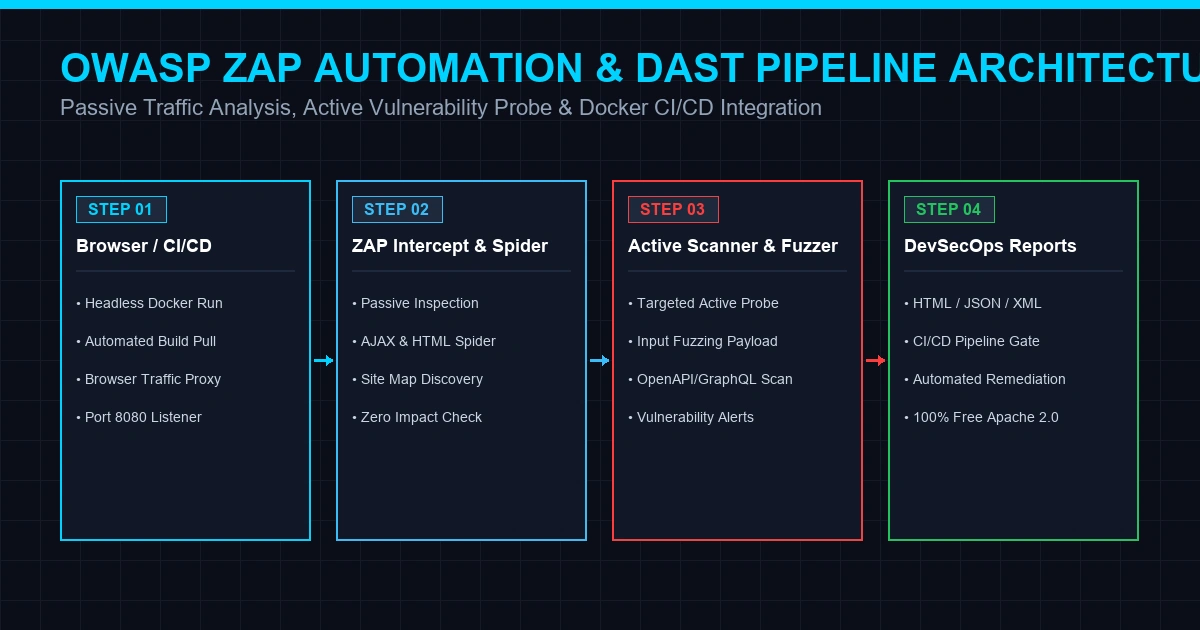
OWASP ZAP Execution & Automation Pipeline Architecture
Understanding ZAP's operational pipeline clarifies how it functions in both desktop manual testing and containerized CI/CD builds:
+-------------------------------------------------------------------------------+
|             OWASP ZAP Execution & Automation Pipeline Architecture            |
+-------------------------------------------------------------------------------+
|  [Browser / CI-CD Build Engine] (Target Listener: localhost:8080)             |
|        |                                                                      |
|        v                                                                      |
|  [OWASP ZAP Intercepting Proxy] (Root CA Certificate TLS Termination)         |
|        |--> [Passive Scanner] (Zero-Impact Header & Cookie Inspection)        |
|        |--> [Spider & AJAX Spider] (Endpoint & JavaScript DOM Discovery)      |
|        |--> [Active Scanner & Fuzzer] (Targeted OWASP Top 10 Payloads)        |
|        |--> [YAML Automation Framework / Docker Engine]                       |
|        |                                                                      |
|        v                                                                      |
|  [Target Application / REST API] (Receives Inspected & Tested Requests)       |
|        |                                                                      |
|        v                                                                      |
|  [Alerts & Report Generation] (Exportable HTML, JSON, XML, Markdown Reports)   |
+-------------------------------------------------------------------------------+
Download & Installation Guide
Always download OWASP ZAP from the official ZAP downloads page (zaproxy.org/download) or official GitHub releases repository (github.com/zaproxy/zaproxy). Avoid third-party mirrors.
Installation Methods by Operating System
| Platform | Official Installation Method |
|---|---|
| Windows | Download official Windows installer from zaproxy.org; requires Java 17+ (installer options with bundled JRE available). |
| Kali Linux | Pre-installed by default (zaproxy). To update: sudo apt update && sudo apt install zaproxy. |
| Ubuntu / Debian | Download official Linux installer .sh script from zaproxy.org or install via official ZAP repository package. |
| Fedora / RHEL | Download official Linux installer script from zaproxy.org. |
| Arch Linux | Install via AUR (aur/zaproxy) or use the official Linux installer script. |
| macOS | Download official macOS installer package from zaproxy.org (bundles compatible Java runtime). |
| Docker | Pull official stable Docker container: docker pull ghcr.io/zaproxy/zaproxy:stable. |
Java Runtime Requirements
Windows and Linux desktop installers require Java 17 or later. macOS installers bundle a compatible Java runtime environment. Official Docker images do not require a separate Java installation on the host machine.
Verifying Installation & Updates
Launch ZAP and inspect the version number string displayed in Help -> About, or run zap.sh -version in Linux/macOS terminals. ZAP checks for core updates automatically and allows updating add-ons directly from the Manage Add-ons Marketplace menu.
Browser Proxy & Root CA Certificate Setup
To intercept encrypted HTTPS traffic without browser certificate warnings:
- Local Proxy: Point your browser's proxy settings to
localhost:8080, or use ZAP's built-in Quick Start -> Launch Browser button, which auto-configures browser proxy settings. - Root CA Certificate: Export ZAP's Root CA certificate via Tools -> Options -> Dynamic SSL Certificates, click Save, and import it into your browser's trusted Root Certification Authorities store.
Getting Started Step-by-Step Tutorial
The steps below assume you are testing an application you own or have explicit written authorization to assess.
- Launch OWASP ZAP: Open ZAP and choose Persist Session or Temporary Session for quick testing.
- Launch Built-in Browser: Click Quick Start and select Launch Browser. ZAP will launch an isolated browser instance pre-configured to route through the proxy.
- Install CA Certificate (External Browser): If using external Firefox/Chrome, import ZAP's Root CA certificate into the browser certificate store.
- Understand the GUI:
- Sites Tree (Left): Displays the hierarchical map of discovered domains, paths, and endpoints.
- Request/Response Panes (Top Right): Shows raw HTTP headers, parameters, and response body data.
- Alerts Tab (Bottom): Summarizes identified security vulnerabilities, risk levels, and descriptions.
- Execute Passive Scan: Simply browse the target application using the proxied browser. ZAP automatically analyzes traffic in the background without sending extra requests.
- Execute Active Scan: Right-click the target domain in the Sites Tree and select Attack -> Active Scan. ZAP will send targeted payloads to evaluate input parameters.
- Review Identified Alerts: Click the Alerts tab to inspect flagged vulnerabilities, risk ratings (High, Medium, Low, Info), confidence levels, and attack payloads.
- Export Audit Reports: Navigate to Report -> Generate Report, choose your desired template and format (HTML, JSON, XML, Markdown), and save the audit findings.
Real-World Use Cases
OWASP ZAP is an essential tool across multiple software development and cybersecurity domains:
- Web Application Security Testing: Primary use case for identifying OWASP Top 10 vulnerabilities in production and staging web applications.
- Secure Development Lifecycle (SDLC): Integrating security testing into early development phases rather than relying solely on pre-release audits.
- DevSecOps Pipeline Automation: Running automated headless ZAP scans as quality gates in continuous delivery pipelines.
- CI/CD Security Testing: Executing containerized ZAP scans automatically on pull requests or nightly builds using official Docker images.
- API Security Auditing: Importing OpenAPI specifications and GraphQL schemas to audit RESTful and microservice API endpoints.
- Security Audits & Compliance: Generating documented audit evidence for ISO 27001, SOC 2, and PCI-DSS compliance reviews.
- Cybersecurity Education: Serving as a foundational hands-on tool for security students and university web application security courses.
- Bug Bounty Preparation: Practicing manual request tampering and vulnerability verification before participating in bug bounty engagements.
Advantages & Limitations
Key Advantages
- 100% Free & Open Source: Licensed under the Apache License 2.0 with no paid tiers, feature gating, or subscription fees.
- Native DevSecOps Automation: Industry-leading Automation Framework and Docker integration for build pipelines.
- Dual Scanning Engine: Combines safe background passive scanning with active vulnerability probing.
- Beginner-Friendly GUI: Approachable graphical user interface suitable for developers and students.
- Rich Add-on Marketplace: Active Marketplace ecosystem providing community and enterprise extensions.
- Cross-Platform: Runs natively across Windows, Linux, macOS, and Docker containers.
Limitations
- Learning Curve for Active Scans: Configuring authentication scripts and tuning active scan policies requires practice.
- False Positive Review: Automated scanner alerts require manual verification by a security engineer before reporting as confirmed findings.
- Scan Tuning Required: Large, complex single-page applications may require AJAX Spider tuning to optimize scan duration.
Authorized Testing & Legal Guidelines
OWASP ZAP includes active scanning tools that transmit attack payloads across network boundaries. Always observe strict legal guidelines:
- Authorized Scope Only: Only run active scans against applications you own or have explicit, written permission to test. Unauthorized scanning can violate cybercrime legislation.
- Validate Findings Manually: Treat scanner alerts as leads, verifying potential vulnerabilities manually before submitting reports.
- Secure Audit Reports: Exported HTML and JSON reports contain sensitive endpoint details and vulnerability data - store scan reports securely.
- Use Isolated Test Labs: Practice active scanning inside dedicated, isolated lab environments (such as OWASP Juice Shop or WebGoat).
Pricing & Open-Source Licensing
| Attribute | Details |
|---|---|
| License | Apache License 2.0 |
| Cost | $0 (100% Free Forever) |
| Paid Tiers | None - All features (Active Scanning, API Testing, Automation, Docker) are fully unlocked for all users. |
| Commercial Support | Community-driven via official documentation, GitHub Discussions, and community forums. |
OWASP ZAP vs Alternatives Comparison
| Tool | Licensing & Cost | Automation Strength | Ease of Use | Typical Users |
|---|---|---|---|---|
| OWASP ZAP | Free Open Source (Apache 2.0) | High (Automation Framework, REST API, Docker) | Beginner-Friendly | Developers, AppSec Engineers, Students, DevSecOps Teams |
| Burp Suite Community | Free Proprietary | Limited (Manual proxy tools only; no scanner) | Moderate | Security learners, manual pentesters |
| Burp Suite Professional | Paid Commercial Subscription | High (Full automated scanner) | Moderate | Professional penetration testers & AppSec auditors |
| Nikto | Free Open Source | Command-Line Scriptable | Simple | Quick web server misconfiguration checks |
| Acunetix / Invicti | Paid Enterprise Commercial | High Enterprise Automation | Polished GUI | Large enterprise AppSec teams requiring vendor dashboards |
When OWASP ZAP is the Better Choice
When budget is a consideration, when you require strong CI/CD automation without licensing costs, or when you are learning web application security from scratch.
When Burp Suite Professional Makes Sense
For professional security consultancies requiring Burp's mature manual testing workflows and extension ecosystem during contracted client engagements.
Frequently Asked Questions (FAQs)
1. What is OWASP ZAP?
OWASP ZAP (Zed Attack Proxy) is a free, open-source Dynamic Application Security Testing (DAST) platform used to identify vulnerabilities in web applications and APIs.
2. Is OWASP ZAP completely free?
Yes. OWASP ZAP is 100% free and open source under the Apache License 2.0, with no paid tiers, commercial subscriptions, or feature gating.
3. What is the difference between OWASP ZAP and Burp Suite?
OWASP ZAP is fully open source and includes automated scanning, REST API control, and CI/CD integration at no cost. Burp Suite Community is manual-only, while its automated scanner requires a paid Professional subscription.
4. Can OWASP ZAP be integrated into CI/CD pipelines?
Yes. OWASP ZAP features an official Automation Framework, REST API, and pre-built Docker containers (ghcr.io/zaproxy/zaproxy:stable) specifically designed for automated DevSecOps build pipelines.
5. Can beginners learn web security using ZAP?
Yes. ZAP's intuitive graphical interface and automatic passive scanning make it one of the most accessible tools for students and developers learning the OWASP Top 10.
Summary & Master Reference Table
| Module | Component | Primary Operational Role |
|---|---|---|
| 01 Core Proxy | Intercepting Proxy | Captures and tampers with live HTTP/HTTPS traffic in transit |
| 02 Discovery | Spider & AJAX Spider | Crawls application HTML and JavaScript DOM to map endpoints |
| 03 Scanning | Passive & Active Scanner | Zero-impact background analysis + active vulnerability probing |
| 04 API Security | OpenAPI & GraphQL | Parses API definitions and audits RESTful / GraphQL endpoints |
| 05 Automation | Automation Framework & Docker | Executes headless YAML scan plans in CI/CD build pipelines |
| 06 Reporting | Export Engine | Produces structured HTML, JSON, XML, and Markdown audit reports |
Authored & Verified by Himanshu Borikar (@Layer8sec)
Published on layer8sec Technology & Cybersecurity Audits